ATP - OOS Batch Processing
References
Overview
In order to process the OOS file for Availability to Promise we need to create a new ecstask:
Polls an SQS queue for a batch ID.
Read from the Out of Stock API Database for a batch given that ID.
Calls the homedelivery-app API to:
Put each item with the dates on the batch from the DB
Write an error record for the items in error to S3
Write an success record for the items that have been processed to S3
Components
![@startuml ATP OOS File Processing Lambda
skinparam defaultTextAlignment center
package "ATP File Processing" {
[<<AWS SQS Queue>> \n SQS Queue BatchID \n<<Jira: SPDP-1061>>]
[<<AWS ECS Task>>\n AWS Batch Processing Task\n<<Jira: SPDP-873)>>]
[<<AWS S3 Bucket>>\n S3 Report Bucket\n<<Jira: SPDP-739>>]
}
@enduml](../../../_images/plantuml-9c20e2eafaa370738cd5b5fc574c1fae9187ce81.png)
Activity diagram
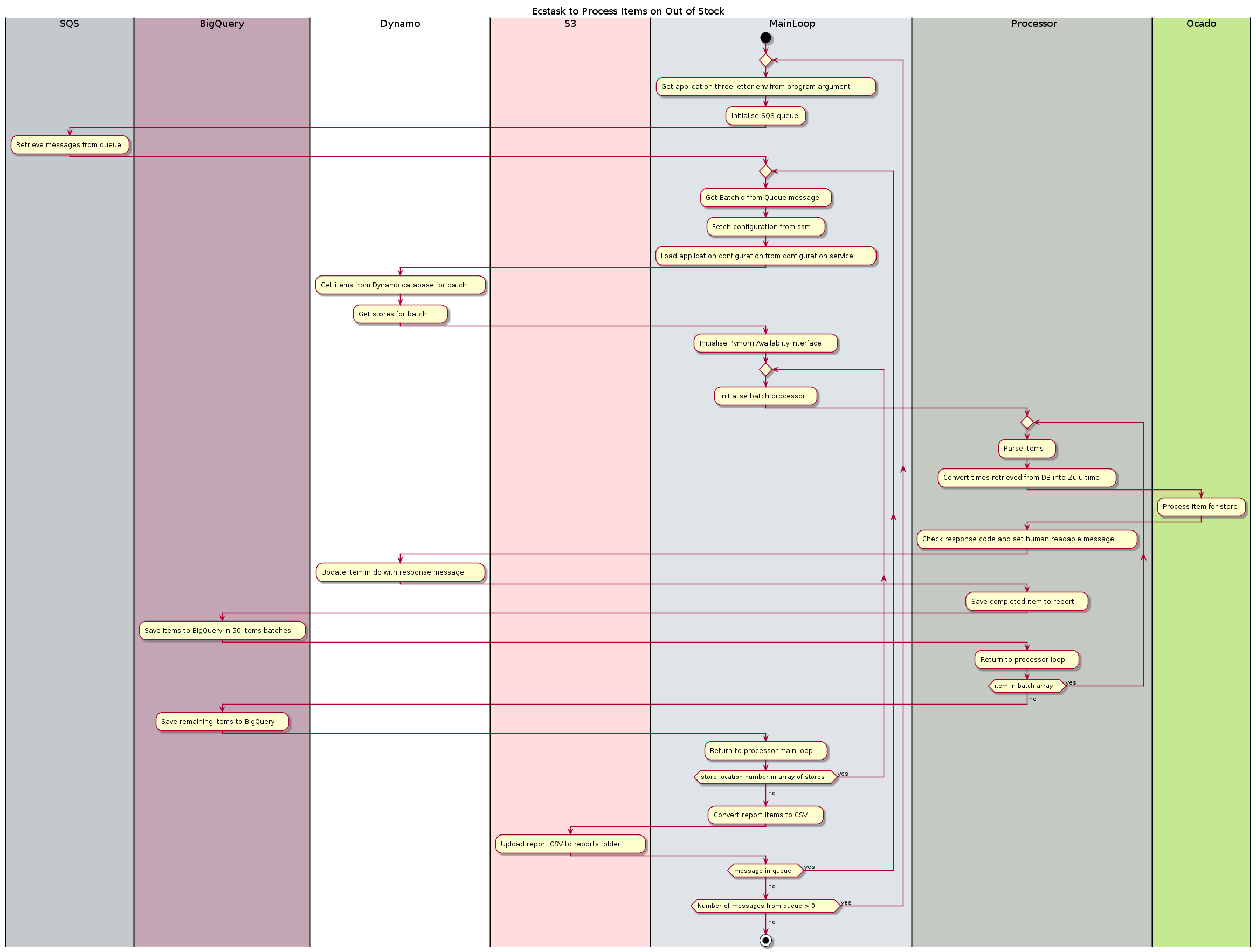
SQS Queue Item Format
{
    'batchId': <id of batch Int>
}
Report File Format (CSV)
Header |
Description |
|---|---|
Batch ID |
The Id of the batch |
MIN |
The min of item (the item ID) |
Store |
The store number |
Status |
The result of the processing, can be; “COMPLETED”, “NOT_FOUND” and “FAILED” |
Message |
Default “N/A”, on error the human readable message returned from the exception in the application |
Workspace Configuration
"ecr": {
    "serviceName": "oos-batch-processing-task-v1"
},
"ecs-task": {
    "twoDigitSeqId": "01",
    "threeDigitSeqId": "001",
    "shortServiceName": "os-bp",
    "taskCpu": 200,
    "taskMemory": 1024,
    "taskMemoryReservation": 512,
    "containerPort": 8080,
    "desiredCount": 1,
    "deploymentMinimumHealthyPercent": 100,
    "deploymentMaximumPercent": 100
},
"sqs": {
    "delay_seconds": 1,
    "max_message_size": 1024,
    "message_retention_seconds": 86400,
    "receive_wait_time_seconds": 1,
    "content_based_deduplication": true,
    "visibility_timeout_seconds": 43200
}
Fatal Error Codes
Exit Code |
Description |
Solution |
|---|---|---|
500 |
An unexpected error occurred |
View the logs on cloudwatch and investigate the issue |
501 |
The env you have passed to the application is not the correct length. |
When running the application make sure to use the 3 letter environment abbreviations e.g. sit dev uat etc |
502 |
There was an issue when connecting to SSM |
Check the parameter exists in the key store and if the application can connect to aws |
503 |
The parameter store was found but what was returned does not match the keys the application was expecting |
Check that the ssm key store has not been updated recently. If it has a code change is required to update the dictionary keys expected by the application |
504 |
The parameter store was found but the type returned was not a dictionary |
Check if there been a recent change to the structure returned by boto3 SSM client and that the key store you are using has not been edited. A code change will be required to resolve this issue if there as been a change to the client |
505 |
The execute method was not called when using the application dependencies object, or it was called but the credentials failed to initialise |
Check if there has been a recent code refactor, if so make sure the code is executed in order |
506 |
The table name for the storepick batch item table is missing in the configuration |
Check if the json in config service has OOS_ITEMS_TABLE_NAME |
507 |
The table name for the storepick batch config table is missing in the configuration |
Check if the json in config service has OOS_CONFIG_TABLE_NAME |
508 |
The transaction per second limit is missing in the configuration |
Check if the json in config service has OSP_TPS |
509 |
The OSP_REPORT_BUCKET was not in config |
Check if the json in config service has OSP_REPORT_BUCKET |
510 |
The OSP_REPORT_BUCKET_KEY was not in config |
Check if the json in config service has OSP_REPORT_BUCKET_KEY |