ATP - New OOS ATP Processing Lambda
References
Code Documentation:
Overview
At a high level, the ATP OOS processing does the following:
{
    "trigger_id": "ATP_OOS_Processing"
}
Components
![@startuml ATP OOS File Processing Lambda
skinparam defaultTextAlignment center
package "ATP File Processing" {
[<<AWS Lambda>>\nAWS File Processing Lambda] as AWSLambdaProcessing
[<<AWS S3 Trigger>>\nNew S3 trigger to invoke Lambda] as AWSS3Trigger
[<<class>>\nS3 input file loader] as S3InputFile
[<<class>>\nS3 File processing] as S3FileProcesser
[<<class>>\nBatch Interface] as batch_interface
[<<class>>\nS3 Batch Processor] as batch_processor
}
@enduml](../../../_images/plantuml-03413c7029ddf5a9b787fda78ba34acdfd5958cc.png)
AWS Processing Lambda
Terraform configuration
"s3_oos_processing_lambda": {
    "processing_lambda_name": "s3_processing",
    "processing_handler": "s3_oos_processing_lambda/s3_atp_processing.lambda_function",
    "application_service": "atp",
    "lambda_sequence_3d": "001",
    "atp_base_folder": "ATP_OOS_Files",
    "atp_complete_folder": "complete",
    "atp_pending_folder": "pending",
    "atp_error_folder": "error",
    "atp_archive_folder": "archive",
    "atp_processing_folder": "processing",
    "atp_reports_folder": "ATP_OOS_Reports",
    "atp_file_filter": ".csv"
}
AWS S3 Process file Trigger
A new AWS trigger notification needs configuring to invoke the new lambda created, see Add notification configuration to Lambda Function
Add terraform code to “ops/terraform/lambda_page_handler/terraform.tf” to create a new trigger
Add terraform vars file “ops/terraform/lambda_page_handler/variables.tf”
Add configuration for each environment in configs/develop and configs/release
Trigger will be on path and filespec:
ATP_OOS_Files\pending\*.csv
Sequence diagram
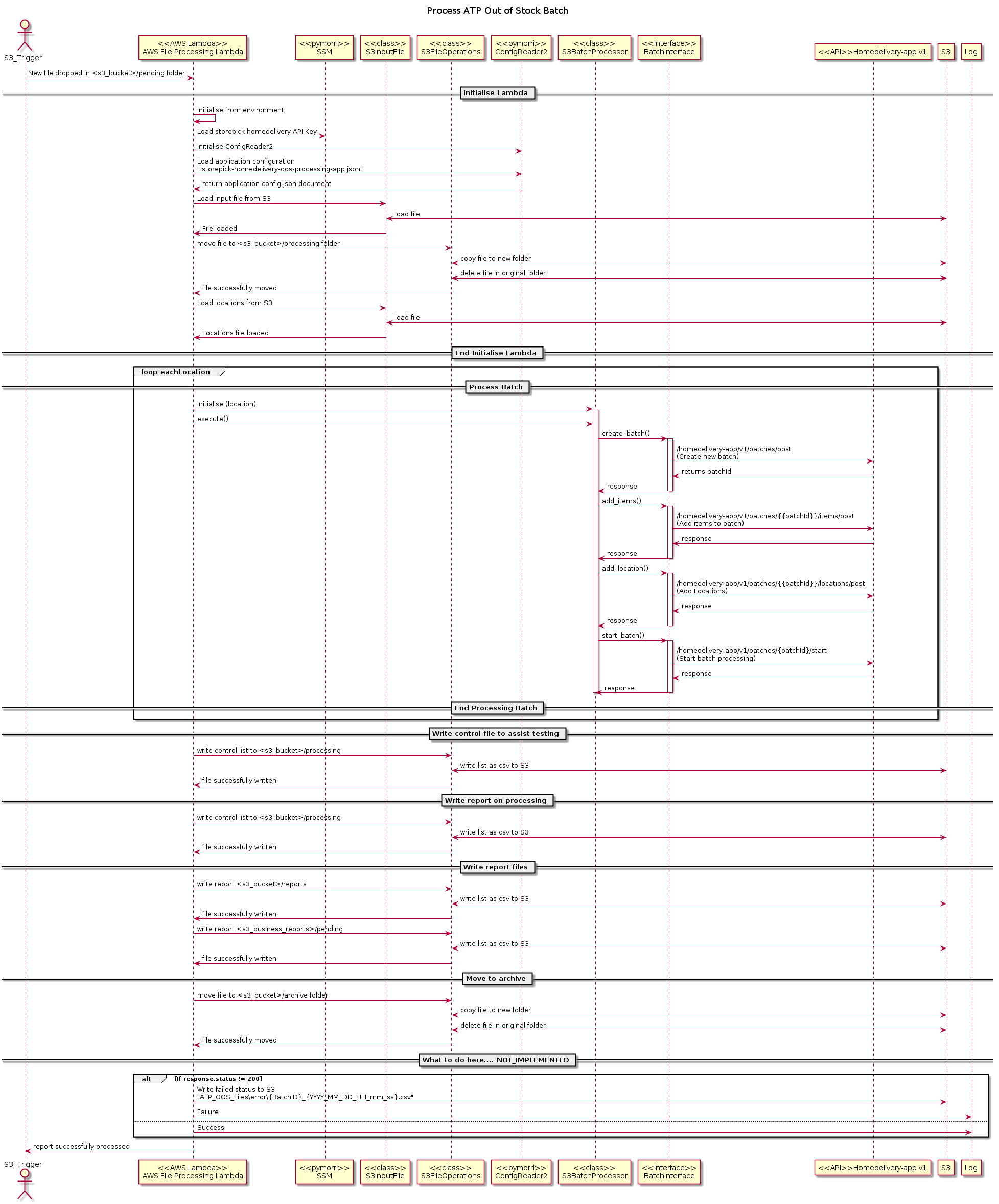
Input File
Input file will be picked up from the S3 bucket
Env |
S3 Bucket |
|---|---|
dev |
mdev.hmdel.digital.strpck.vsnqpizveh |
sit |
msit.hmdel.digital.strpck.xgnkpgnnsq |
uat |
muat.hmdel.digital.strpck.iklukyfiba |
prd |
and filespec
ATP_OOS_Files\pending\*.csv
Column |
Value |
|---|---|
Store ID |
Store where the item needs marking out of stock |
MIN |
Morrisons product identifier |
Description |
description of the item in the file |
Start Date |
Date from which the item is out of stock |
Relist Date |
Date the item is to be brought back in to stock |
Control File
In order to assist in testing and diagnosis a control file will be written to the processing folder. The control file will be in CSV format and contain a list of locations with their associated batch ID
ATP_OOS_Files\processing\{input_filename}_test_{YYYY_MM_DD_HH_mm_ss}.csv
Column |
Value |
|---|---|
Location |
Morrisons location 3 digit store ID |
Batch ID |
Allocated batch ID |
Number MINs |
Number of MINS to process for this batch |
Error File
Error file should be written to the bucket
Env |
S3 Bucket |
|---|---|
dev |
mdev.hmdel.digital.strpck.zgtiaurlhr |
sit |
msit.hmdel.digital.strpck.xgnkpgnnsq |
uat |
muat.hmdel.digital.strpck.iklukyfiba |
prd |
and key specification (for a batch where only some of the items are in error)
ATP_OOS_Files\error\{original_filename}_{BatchID}_{YYYY_MM_DD_HH_mm_ss}.csv
or the key specification (where all of the items are in error
ATP_OOS_Files\error\{original_filename}_{YYYY_MM_DD_HH_mm_ss}.csv
Column |
Value |
|---|---|
MIN |
Morrisons product identifier |
Store ID |
Store where the item needs marking out of stock |
Start Date |
Date from which the item is out of stock |
Relist Date |
Date the item is to be brought back in to stock |
Failure Reason |
Human readable reason for failure |
Workspace Configuration
{
    "project": "storepick",
    "domain": "digital",
    "region": "eu-west-1",
    "region_id": "euw1",
    "osp_secure_attribute_name": "storepick_oos_service",
    "config_secure_attribute_name": "storepick_config_service",
    "multiregion_secure_attribute_name": "storepick_multiregion_secret",
    "google_secure_attribute_name": "storepick_google_secret",
    "hello_world2_fn_name": "hello_world2",
    "application_service": "atp",
    "processing_lambda_name": "s3_processing",
    "processing_handler": "s3_oos_processing_lambda/s3_atp_processing.lambda_function",
    "lambda_sequence_3d": "001",
    "serviceName": "oos-batch-processing-task-v1",
    "twoDigitSeqId": "01",
    "threeDigitSeqId": "001",
    "shortServiceName": "os-bp",
    "taskCpu": 200,
    "taskMemory": 1024,
    "taskMemoryReservation": 512,
    "containerPort": 8080,
    "cluster": "ecs-euw1-n-digital-vpc001-common-001",
    "securityGroupName": "sgr-euw1-n-digital-vpc001-common-001",
    "securityGroupId": "sg-04c0a60fd3e7f23d2",
    "desiredCount": 1,
    "deploymentMinimumHealthyPercent": 100,
    "deploymentMaximumPercent": 100,
    "hello_world_fn_name": "hello_world",
    "route53_host_name": "spt.digital.morconnect.com.",
    "route53_hosted_zone": "/hostedzone/ZUN8ZOPFXYEBY",
    "lambda_role": "rol-glob-n-digital-lambda-20898",
    "lambda_role_arn": "arn:aws:iam::928369729144:role/rol-glob-n-digital-lambda-20898",
    "execute_ecs_role": "rol-glob-n-digital-ecsEventsRole-38718",
    "execute_ecs_role_arn": "arn:aws:iam::928369729144:role/rol-glob-n-digital-ecsEventsRole-38718",
    "ssm_access_task_role": "rol-glob-n-digital-ecsTaskSsmAccess-18324",
    "ssm_access_task_role_arn": "arn:aws:iam::928369729144:role/rol-glob-n-digital-ecsTaskSsmAccess-18324",
    "jenkins_role": "rol-glob-n-digital-jenkins-45006",
    "jenkins_role_arn": "arn:aws:iam::928369729144:role/rol-glob-n-digital-jenkins-45006",
    "repo_name": "SPDP-877",
    "workspace": "storepick-homedelivery-oos-processing",
    "aws_region_id": "euw1",
    "aws_region": "eu-west-1",
    "aws_environment": "877",
    "git_branch": "feature/SPDP-877-merge-in-skeleton-lambda-pipeli",
    "aws_account_id": "928369729144",
    "aws_s3_bucket_terraform": "mn.xxwmm.digital.terraformstate.storepick",
    "threeCharEnvDescription": "877",
    "oneCharEnvDescription": "n",
    "environment": "sandpit",
    "build_date": "16/10/2019",
    "build_date_time": "10/16/2019_12:42:06",
    "kms_storepick_key_id": "a451ab7e-085e-4923-a60e-783f07b158a4",
    "storepick_data_bucket": "muat.hmdel.digital.strpck.rrbnbmsndy"
}