Create OSP Shell Account Lambda
Overview
This Lambda creates Customer Shell account in OSP. This is done for the OCEAN customers so that they can use Click and Collect facility via OSP platform.
Sequence Diagram
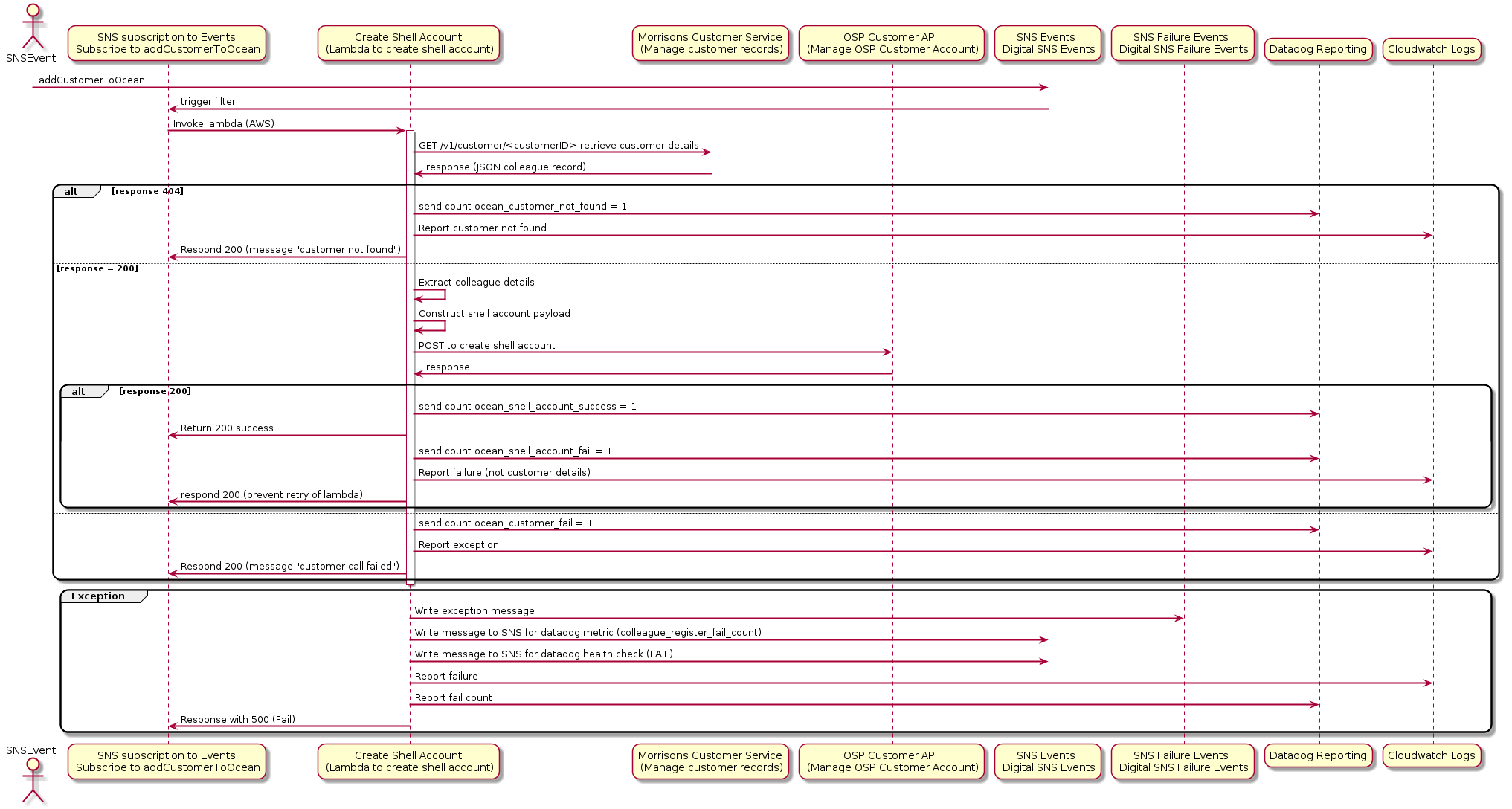
Dependencies
Configuration(from config service)
AWS Lambda
-
lambdas.create_shell_account.prepare_osp_payload(customer_id, customer_detail)[source]¶ This function receives customer_id and customer details from Morrisons Customer v2 API and prepares a payload to be sent to OSP to create OSP customer
- Parameters
customer_id (str) – customerId
customer_detail (dict) – customer details
Example
"customerId": "343434",
"customer_detail": {
        'sourceSystemCustomerId': '039490436575890469032',
        'salutation': 'Mrs',
        'firstName': 'Lindsey',
        'lastName': 'Bradford',
        'email': 'lindsey.bradford@morrisonsplc.co.uk',
        'birthDate': 'string',
        'gender': 'string',
        'phoneNumber': '+7777123456',
        'mobilePhone': 'string',
        'address1': 'string',
        'address2': 'string',
        'address3': 'string',
        'postcode': None,
        'city': 'string',
        'country': 'string',
        'county': 'string',
        'billingAddress1': 'string',
        'billingAddress2': 'string',
        'billingAddress3': 'string',
        'billingPostcode': 'string',
        'billingCity': 'string',
        'billingCountry': 'string',
        'billingCounty': 'string',
        'marketingOptIn': 'string',
        'thirdPartyOptIn': 'string',
        'onlineAccountStatus': 'string',
        'householdSize': 'string',
        'dietaryPreference': 'string',
        'voucherChannelPreference': 'string',
        'saveVouchers': 'string',
        'emailOptIn': 'string',
        'mailOptIn': 'string',
        'phoneOptIn': 'string',
        'smsOptIn': 'string',
        'researchOptIn': 'string'
}
- Returns
- Return type
osp_customer_payload (dict)
Example
osp_customer_payload = {
            "details": {
                "attributes": [
                    { "name": "firstName", "value": "John" },
                    { "name": "lastName", "value": "Doe" },
                    { "name": "title", "value": "Mr" },
                ],
                "emailAddress": "arif@examole.com",
                "fullName": f"{first_name} {last_name}",
                "preferredLanguage": "en-gb",
                "preferredName": f"{first_name} {last_name}"
            },
            "retailerBannerIds": [ "morrisons" ],
            "retailerCustomerId": customer_id
    }
-
lambdas.create_shell_account.post_sns_event_for_add_customer_to_group(customer_id, group_id, club_id, club_name, bq_date)[source]¶ This function will post an event onto sns-euw1-<ENV>>-digital-storepick-events Topic with message attribute as addCustomerToGroup
- Parameters
customer_id (str) – customerId
group_id (str) – group_id to add customer to
club_id (str) – club_id to add customer to
club_name (str) – club_name to add customer to
Example
"customerId": "343434"
- Returns
on successful posting of event onto sns-euw1-<ENV>>-digital-storepick-events Topic
- Return type
True (bool)
-
lambdas.create_shell_account.lambda_handler(event, context)[source]¶ Lambda receives customerId. Then confirms if it is a Morrisons customer. Then proceed to create an OSP account for the customer. Before doing so it checks whether the customer already exist in OSP. If yes throws error or if no creates the same
- Parameters
event (dict) – customerId
Example
event = {
    "customerId": "343434",
}
event = {
    "Records": [
        {
            "EventVersion": "1.0",
            "EventSubscriptionArn": "arn:aws:sns:us-east-2:123456789012:sns-lambda:21be56ed-a058-49f5-8c98-aedd2564c486",
            "EventSource": "aws:sns",
            "Sns": {
                "SignatureVersion": "1",
                "Timestamp": "2019-01-02T12:45:07.000Z",
                "Signature": "tcc6faL2yUC6dgZdmrwh1Y4cGa/ebXEkAi6RibDsvpi+tE/1+82j...65r==",
                "SigningCertUrl": "https://sns.us-east-2.amazonaws.com/SimpleNotificationService-ac565b8b1a6c5d002d285f9598aa1d9b.pem",
                "MessageId": "95df01b4-ee98-5cb9-9903-4c221d41eb5e",
                "Message": "{ "eventType": "addCustomerToOcean", "eventData": { "customerId": "1234567", "groupId": "1111-2222" }, "config_file": "storepick.json", "bq_date": "2020-11-03T16:58:53.265025", "club_id": "6", "club_name": "Colleague" }",
                "MessageAttributes": {
                    "eventType": {
                        "Type": "String",
                        "Value": "logRowToBq"
                    }
                },
                "Type": "Notification",
                "UnsubscribeUrl": "https://sns.us-east-2.amazonaws.com/?Action=Unsubscribe&SubscriptionArn=arn:aws:sns:us-east-2:123456789012:test-lambda:21be56ed-a058-49f5-8c98-aedd2564c486",
                "TopicArn": "arn:aws:sns:us-east-2:123456789012:sns-lambda",
                "Subject": "TestInvoke"
            }
        }
    ]
}
- Returns
response from the lambda
- Return type
event (dict)
Example
event = {
    'status': 200,
    'message': 'Shell account creation completed successfully',
    'results': {},
    'headers': {'content-type': 'application/json'}
}
event = {
    'status': 404,
    'message': 'HTTP 404 - Morrisons customer not found for id 1014860340',
    'results': {},
    'headers': {'content-type': 'application/json'}
}
event = {
    'status': 500,
    'message': 'Error getting Morrisons customer record for id 1014860340',
    'results': {},
    'headers': {'content-type': 'application/json'}
}
event = {
    'status': 500,
    'message': 'Customer id 1014860340 already exist in OSP',
    'results': {},
    'headers': {'content-type': 'application/json'}
}
- Raises
MoriException – MoriException thrown when customerId not found in Morrisons service
MoriException – MoriException thrown when customerId trying to find customer in OSP
MoriException – MoriException thrown when customerId already exist in OSP
MoriException – MoriException thrown when customerId trying to create customer in OSP