Process Ocean Events Lambda
Overview
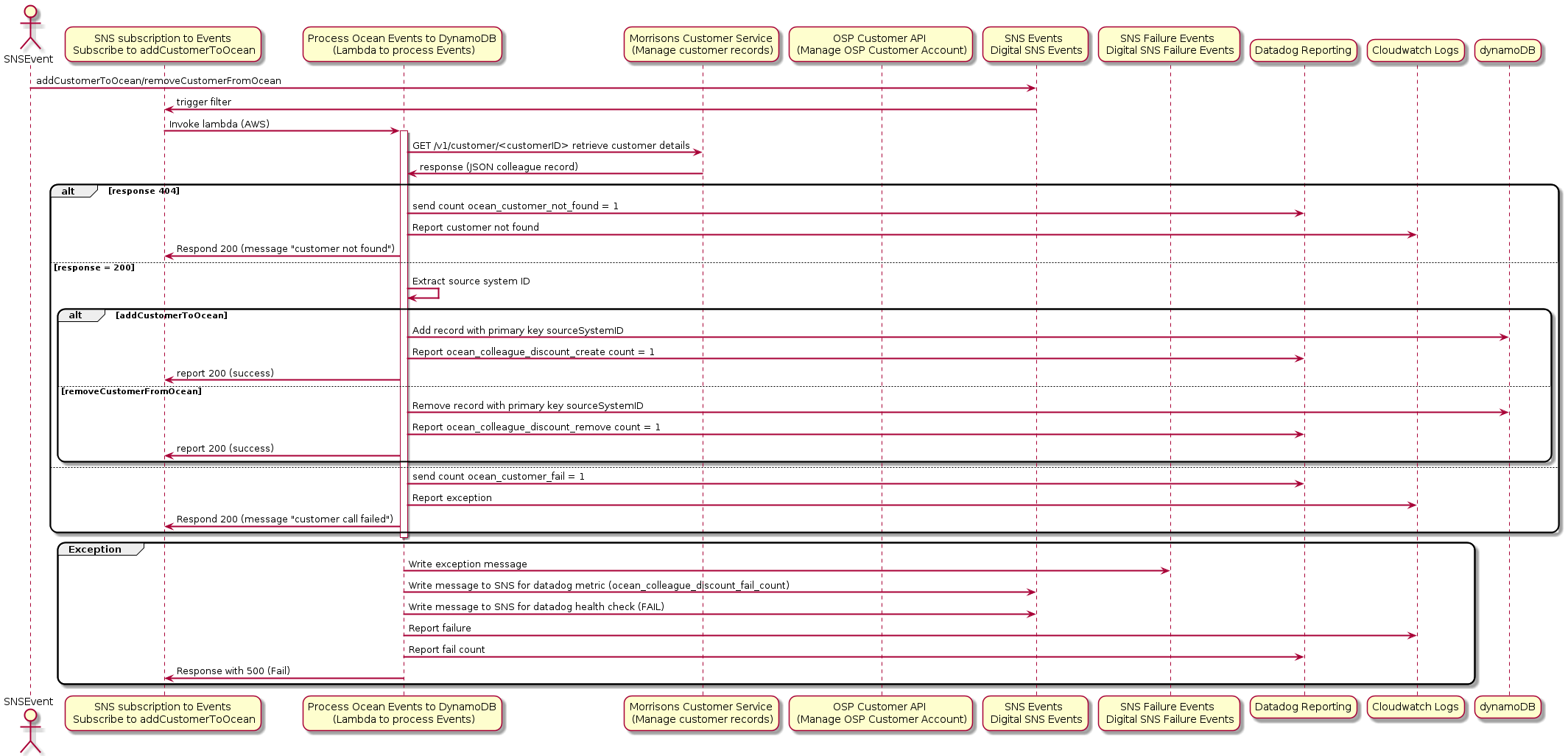
Based on whether a Colleague is joining or leaving Morrisons he/she needs to be added or removed from Ocado’s OCEAN discount.
The OCEAN customers signed up from new portal are being maintained in ENV.xxwmm.storepick.ocean_colleague_discount Dynamodb table. The job of this lambda is to remove or add received customerIds from the Dynamodb table.
Extract from this table is further used to create a CSV file to be uploaded to OCEAN with current Customers in it.
Sequence Diagram
Dependencies
Configuration(from config service)
Code
-
lambdas.process_ocean_events.delete_from_dynamodb(dynamodb, source_system_cust_id, table_name)[source]
-
lambdas.process_ocean_events.put_into_dynamodb(dynamodb, source_system_cust_id, table_name)[source]
-
lambdas.process_ocean_events.lambda_handler(event, context)[source]¶ This lambda receives event from SNS (event example given further below)
- For eventType ‘addCustomerToOcean’:
Lambda gets event from SNS with data to create rows in dynamodb table ENV.xxwmm.storepick.ocean_colleague_discount related to provided customerId.
- For eventType ‘removeCustomerFromOcean’:
Lambda removes rows related to provided customerId from above dynamodb table.
- Additionally function post CHECK status to DataDog API:
metric name: colleague_discount_check in DataDog
app name: storepick_colleague_discount
- It sends:
value 0 (SUCCESS) when this function returns 200
value 2 (ERROR) when this function throws exception + exception is handled and processed in build_response_or_throw decorator and error response with 500 or 4xx is sent.
- Input:
event (dict) - required: eventType, eventData
{
    "eventType": "addCustomerToOcean|removeCustomerFromOcean",
    "eventData":
    {
        "customerId": "1234567"
    }
}
- Output:
event (dict) - required: eventType, eventData
{
    "eventType": "addCustomerToOcean",
    "eventData":
    {
        "customerId": "1234567"
    }
}
- Raises
MoriException – MoriException containing details about exception