StorePick HFSS Refresh Task
Overview
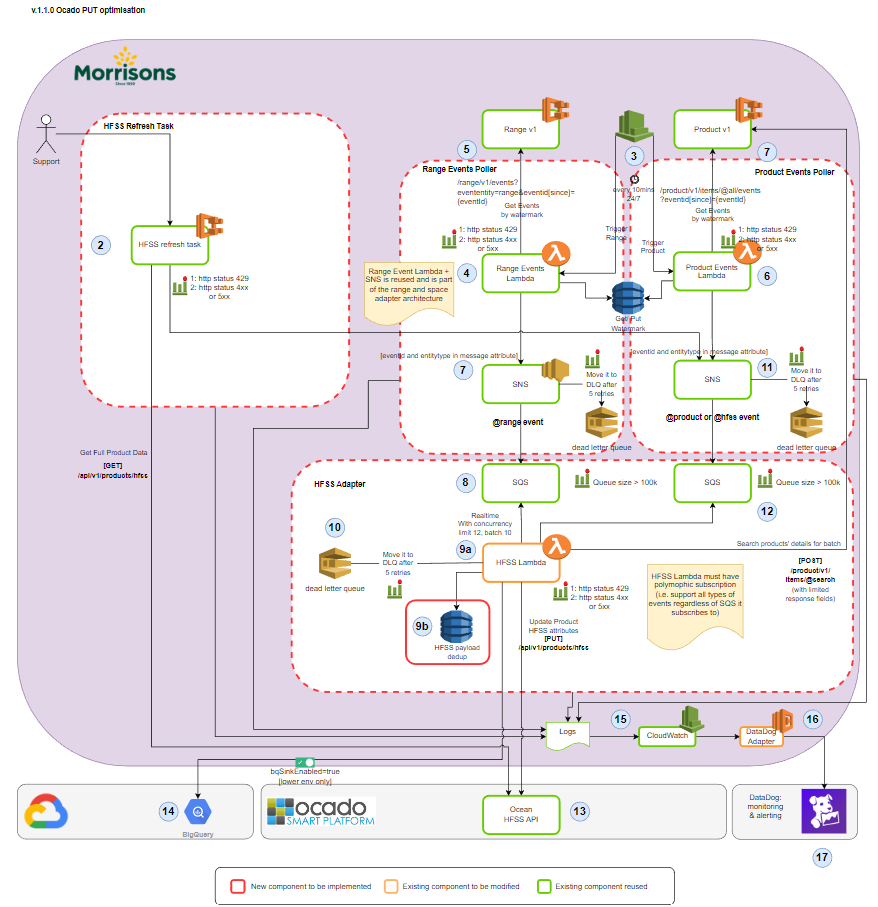
ECS Task will be triggered by support team manually.
Call range V1 GET API /v1/products/hfss?pageToken=1648788 to retrieve all hfss product data.
HFSS Product V1 GET API will give response in list
Prepare structure of list of messages from HFSS Product V1 GET API response to publish in batch to SNS. (mode = day0)
List of messages will publish in SNS where eventId = lastPageToken and eventEntity = hfss message attributes in batch of 10.
Publish Batch SNS method will return response with Successful and Failed records.
Account Needed
AWS accounts will be required for DEV/SIT/PROD.
References
Python Service with infrastructure as code.
Unit tests & code coverage at about 90%+
Configuration for multiple environments, DEV/SIT/PRD
Document |
Ref |
|---|---|
Architecture Document |
|
Jira Story |
|
Bitbucket repository |
Testing Approach
We will be using a BDD approach where the behaviour will be tested first the code will be developed to match the tested behaviour.
Deployment strategy
The deployment is handled by a jenkins multibranch pipeline, https://jenkins.p.morconnect.com/digital/job/storepick-hfss-refresh-task/.
The commit in the develop branch will automatically deploy the application to the aws environments.
The release is done by standard process of tagging the release branch, and by building and deploying
from the tags. The tag format is sit-v*-<commit> for nonprod and prd-v*-<commit> for the production
release. These tags are manually built on jenkins after the change request has been approved. The
release branch is merged to the stable master branch after the successful production deployment.